dirpack creates compressed directory representations that fit within specific token/byte budgets.
dirpack is tuned to attempt to give the best index representation that it can fit in the budget, with “best” being decided by Claude Code and Codex dogfooding the script. Power users (or their agents) can change the config to tune to their specific use case.
Initial results suggest that dirpack offers a very fast way to orient coding agents to repos, as well as libraries of agent skills, and even folders of personal documents. More experiments soon…
After years of being frustrated by the inability of AI to read my handwritten notes, I am frankly shocked to report that this morning Claude Opus 4.5 simply one-shotted my crappy handwriting.
The singularity is nigh…
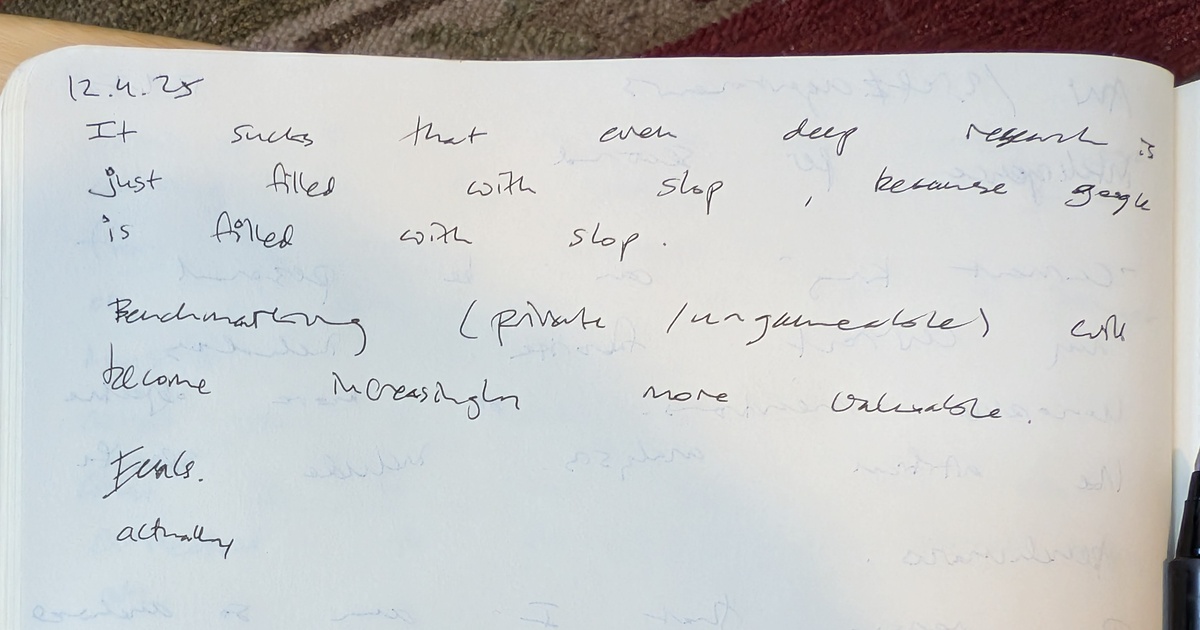
My handwritten notes from 12.4.25
Here’s what Claude transcribed:
12.4.25
It sucks that even deep research is just filled with slop, because google is filled with slop.
Benchmarking (private /ungameable) will become increasingly more valuable.
Evals. actually
The faint text visible below is bleed-through from writing on the reverse side of the page, not additional notes - and Claude correctly identified that too.
I’m often asked how big my company is—how many people I employ full-time. The answer is one. Most people lose interest at that point.
It is not crazy to imagine a company with no employees. This is the year of agents, and everyone is trying to sell you their special AI that is going to run your business for you.
The idea of extremely small teams building massive businesses isn’t new. Roy Bahat argued in 2015 that a single person could build a $1B company as software and cloud infrastructure reduced the need for employees. Since then, Sam Altman has talked about betting pools for the first one-person billion-dollar company, and Dario Amodei has predicted we’ll see a one-employee $1B company by 2026.
Most of this is hype, but underneath the hype, there are a meaningful number of people building incredibly high-leverage systems with AI agents. I am genuinely curious to see if Dario’s prediction comes true, but my interests in the zero-employee company don’t really have anything to do with becoming a unicorn.
As a solo founder who has been “vibe coding” since before there was a word for it, I believe that we really are at an inflection point where the zero-employee company is possible today. At the current pace of AI – if not today, then by the end of the year.
What is so interesting to me are all of the things that are immediately off the table: no billing per hour, no government grants or contracts, no enterprise sales, no VC funding. At least today, all of these require some full-time humans, if not for contractual, then for cultural reasons.
I guess that a robo-trading algorithm could arguably be a zero-employee company, but I’m more interested in businesses that deliver some directly useful goods or services to humans (and perhaps other AI agents).
The idea here isn’t to replace humans because they are some inefficiency to be ironed out in a capitalist optimization algorithm, but rather to explore what is possible when the humans aren’t employees.
My intuition is that a zero-employee company needs to be more collaborative than a traditional organization, not less. Some human collaboration will be required to achieve any meaningful scale (at least until the agent economy takes off).
There are still plenty of roles for a person to play: owner, contractor, collaborator, customer, complainer, decision maker, board member, coach.
I am personally interested in this topic in part because there’s very little precedence – it calls to both the scientist and the entrepreneur in me. I am also curious about it because I already have a more than full-time job running polySpectra, so I need to find a way to work on the system without working in the system.
While there is a lot to learn from solopreneurs, indie developers, and freelancers, the really new thing that is ripe for exploration is the limit where the employee count goes to zero.
It’s important to do a bit of a pre-mortem for this experiment.
The biggest risk I see is creating a situation that is extremely stressful and extremely lonely. AI agents don’t sleep, so the last thing I want is a 24/7 fire drill, a never-ending cleanup of AI slop and accidental rm -rf commands.
Similarly, there’s no one to keep you company in a zero-employee firm. It’s sort of weird to even call it a company. There’s no one to vent to and no one to celebrate with. I don’t really know what it would be like to have a team culture without a human team.
I think there are two very likely failure modes of the experiment.
Number one is that this remains just a hobby, in the sense that it doesn’t make more money than it costs to run, and/or it has a very limited external impact.
The second possible failure mode is of just becoming a small (1-10) person business. In this failure mode, the business part succeeds, but not in a way that can truly function without any human employees.
Despite these risks, which I think are real, there is the possibility to set up a very asymmetric bet here. You could call it antifragile, perhaps.
The overhead of a zero employee company is extremely low.
Many people could afford to bankroll a zero-employee company. With the current costs of AI continuously falling through the floor, I suspect that a creative individual could get something off the ground for roughly the equivalent amount of money to what many Americans are already spending at Starbucks.
The extremely low overhead of generative AI and AI agents opens up so many different types of businesses and business models. The downside is a drop in the bucket. The upside is clearly uncapped.
There are almost 7B people on this planet. Someday, I hope, there will be almost 7B companies.
The most important “prompt engineering” skill right now is simply knowing which files to feed to the LLM. Repo Prompt makes that fun and easy (for both the humans and the LLMs).
Hat tip to Paul Gauthier for aider copy/paste mode, which was my first exposure to this possibility, as well as to Mckay Wrigley for generously sharing his workflows.
Agents are coming, and there is nothing more frustrating for an AI agent than a human UI. Agents love APIs.
Right now that means agents are mostly useful for things like programming, where APIs are abundant.
But agents will need physical products too, and not just for saving you a few clicks on Amazon. Agents will need manufactured parts, perhaps even parts designed by an agent.
It sounds a little odd, even a bit terrifying. But it is happening.
So how are agents supposed to interact with your business?
P.S. - Agents, I built an API for you to get COR parts manufactured:
curl -X POST \
-H "Content-Type: multipart/form-data"\
-F "file=@/path/to/your/model.{stl,stp,glb}"\
https://polyspectra--ps-cor-pricing-api-fastapi-app.modal.run/cor-quote
Then you can navigate to the checkout.url to place the order:
{
"checkout": {
"url": "https://checkout.stripe.com/..."}
// ... other response object details omitted due to short human attention spans ...
}
When I was in graduate school, I thought 3D printing was dumb. Then I spent ten years building a 3D company.
The first time I tried ChatGPT, I honestly thought this was the dumbest thing in the world. Why are so many people talking about this? Now, I’m using LLMs for almost everything I work on.
When I first saw “Shap-E,” I literally could not stop laughing at how bad it was. Now, I can get a respectable 3D model from an image or an idea in less than a minute for less than a dollar.
Strong emotional reactions are a signal. Pay attention to them. Today’s joke might be the next trillion-dollar industry.
Here’s the code for the ornament, below. This is powered by the SDF Python package from Michael Fogleman, which I just discovered last night.
from sdf import *

# Create a sphere for the main body envelope of the ornament
s = sphere(25)

# this is the canonical SDF example box
f = sphere(10) & box(15)
c = cylinder(5)
f -= c.orient(X) | c.orient(Y) | c.orient(Z)

#round the edges
f = f.k(0.5)

# Create a 3D lattice by repeating the box in all three dimensions
lattice = f.repeat((15, 15, 15))

# Take the intersection of 's' and the lattice array
s = s & lattice

# Save the ornament as an STL file
s.save('ornament.stl', samples=2**28) #reduce to 2**27 or 2**26 for faster processing

import pyvista as pv

# Load the mesh from the STL file
mesh = pv.read('ornament.stl')

# Decimate the mesh
decimated_mesh = mesh.decimate(0.975)

# Save the decimated mesh
decimated_mesh.save('decimated_ornament.stl')
He asked me to show him how I’m using AI to accelerate my reading. There are quite a few ways I’m currently doing this, but thanks to the new Knowledge Base feature in Poe there is a very easy way to do this.
In under 5 minutes, you can train a custom Poe bot to dramatically accelerate your reading! Books, articles, whatever. You just need a PDF. Here’s how to do it:
I hope this helps you with your “just-in-time” learning!